Copyright © 2003-2005 MultiMedia Soft 
Return to index  
 
Other useful settings 
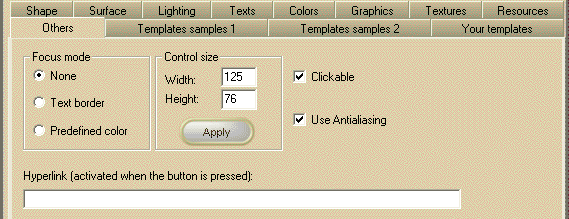
At Design-time, you have the possibility to change some other miscellaneous setting selecting the "Others" tab of the 3D Button Visual Editor application opened from inside the Visual Studio.NET IDE as described inside the chapter Editing control properties through the 3D Button Visual Editor application contained inside the "How to use the product in your projects" section. 
Note: The image below has hot links to each topic shown in the graphic.  
-- -- -- -- -- -- -- -- -- -- -- -- -- --  
 
 
Item name
Description
Corresponding property
 
Focus mode "None"
Sets the focus mode to "None".
 
Focus mode "Text border"
Sets the focus mode to "Text border".
 
Focus mode "Predefined color"
Sets the focus mode to "Predefined color".
 
Control width
The control's width in pixels
Depends upon the development environment
 
Control height
The control's height in pixels
Depends upon the development environment
 
"Apply" button
Applies to the control the dimensions entered inside the "Width" and "Height" edit boxes
 
 
Clickable
Enables/disables the button click
 
Use Antialiasing
Enables/disables the use of anti-aliasing algorithms for rendering the button surface. This option doesn't affect text rendering. (Not available with Light edition)
 
Hyperlink
Sets a connection from your program to another location.


Copyright © 2003-2005 MultiMedia Soft 
Return to index