



 FeaturesWhat's newOnline DocumentationTutorialsDownload trial versionPurchaseScreenshots

Although Active Sound Recorder doesn't have a visible user interface, in this page you will find some screenshot taken from our demo and samples programs. The following is the first dialog of our demo program named Dictation.exe that allows choosing the audio input and output devices and the availability of the Sound Activation System.
The following is the main application dialog: all its features are under the control of Active Sound Recorder. The smaller waveform is a scolling one and can be managed through mouse interaction for fine positioning. All of the visible frames and buttons are rendered through our 3D Active Button Magic ActiveX control.
The screenshot below shows how graphic items can be added to the embedded waveform analyzer in order to enhance the visibility of specific portions of sounds or to add markers that may result of help when searching for a specific position inside the loaded sound.
The screenshot below shows vertical lines, added to the embedded waveform analyzer, each of them having its own buddy picture: in this way it would be easy locating the position inside the loaded sound where an employee starts speaking. Respect to the screenshots above you can appreciate the fact that inside the horizontal scrollbar there is a small representation of the full waveform, allowing an easier scrolling experience.
The screenshot below shows the same vertical lines but in this case each having its own buddy text: in this way it would be easy locating the position inside the loaded sound where a certain event happens
The screenshot below is taken from our CdRipperAutomation.exe sample which shows how to rip CD tracks into MP3 output files.
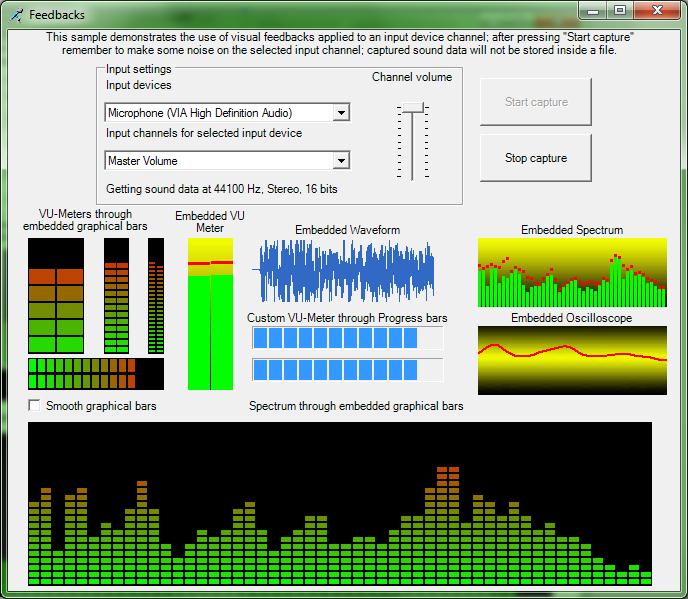
The screenshot below is taken from our Feedbacks.exe sample which shows how to display visual feedbacks during a recording session.
Below a couple of screenshots, taken from the SpectrumEnhanced sample, displaying the embedded enhanced Spectrum Analyzer in both the FFT and the TFFT (spectral view) representations of a sound being recorded or played.
Below a screenshot of the Waveform.exe sample which shows how to customize the look of the embedded waveform analyzer..
|