Applies alpha channel transparency to the button surface.
This property value can range from a default value of 0 (total opacity) to a value of 255 (total transparency). A value entered out of this range produces a value of 0.
Note that setting this property value to 1 will produce an opaque button perfectly anti-aliased with the underlying background: this is very useful if you have an underlying picture.
Below you can see a screenshot of a form (white background) with a picture control containing a set of three identical buttons: the left one has the property set to 0 (total opacity, anti-alias with the form background color), the center one has the property set to 1 (total opacity, anti-alias with the underlying picture) and the right one has the property set to 128 (semi-transparent).
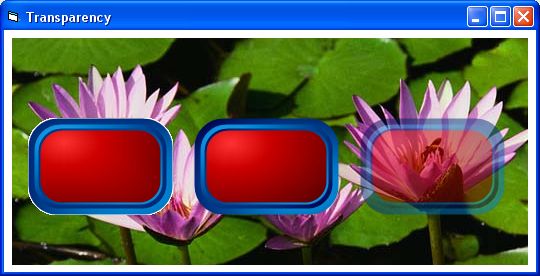
Note that, in case the underlying picture should change, you could force a refresh of the control using the RefreshTransparentControl method.
|


