|
How to use Enumerations |
  
|
|
How to use Enumerations |
|
The use of Enumerations (also known as "enumerated types") is very important because gives more readability to your code: for this purpose we have provided a set of public Enumerations. Here follows the full list of Enumerations with the associated properties; in order to see the values defined by the Enumerations and to understand their meaning, click the associated property:
SAMPLES Here follows a brief sample of the operations needed in order to make use of Enumerations in your code inside the various development environments we have used to test our control; the samples suppose that you have inserted one instance of the control (named MyControl) inside a form and, at runtime inside the Form_Load subroutine, you need to change its shape from the Rectangle default to Ellipse.
With this environment we can easily use the IntelliSense features that will help us assigning the correct value to the Shape property; after having inserted the code MyControl.Shape press the '=' character on your keyboard and you will see the IntelliSense display the listbox of the possible values that can be assigned to the Shape property
select the Ctl3d.Shapes.Ellipse value so the complete line of code will be: MyControl.Shape = Ctl3d.Shapes.Ellipse
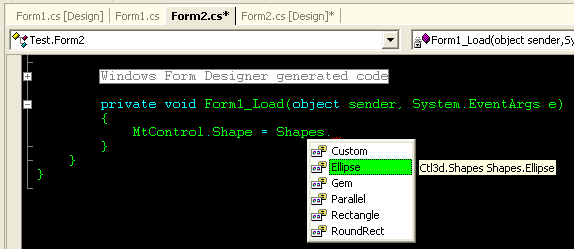
Inside this environment the IntelliSense features are less powerful than inside VB.NET, so we need a couple of line of code that were not needed with the previous environment; first of all we need to insert the following line of code at the beginning of the form management file using Ctl3d; this line of code will add the to the existing namespaces our component namespace. After having inserted the code MyControl.Shape you will see that pressing the '=' character, unfortunately no IntelliSense will be displayed: we need to help the environment with a further information about the kind of value we want to enter; the Shape property, as you will see inside the table at the beginning of this section, is associated to the Ctl3d.Shapes enumerated type, so let's try to enter some more character inside our line of code; after having inserted the code MyControl.Shape = Shapes // Ctl3d. is not needed because we have already "using Ctl3d;" press the dot '.' character and you will see the IntelliSense display the listbox of the values declared inside the Ctl3d.Shapes enumerated type
select the Shapes.Ellipse value so the complete line of code will be: MyControl.Shape = Shapes.Ellipse;
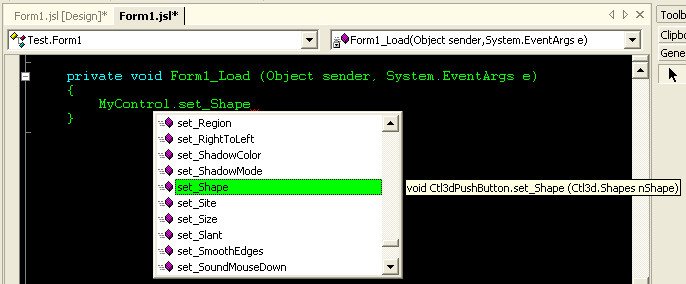
Also with this environment, with some difference, we can use the IntelliSense features; after having inserted the code MyControl you will see that pressing the dot '.' character the IntelliSense will display the available wrapper functions to access the properties of the control; in our case we must scroll until we find the set_Shape function as displayed on the image below:
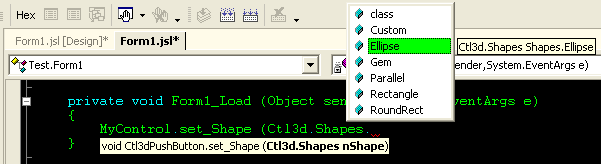
as you can see, the tooltip on the right of the listbox helps us understanding which enumerated type must be assigned to the property, so let's go ahead with the line of code MyControl.set_Shape (Ctl3d.Shapes press the dot '.' character and you will see the IntelliSense display the listbox of the values declared inside the Ctl3d.Shapes enumerated type
select the Ellipse value so the complete line of code will be: MyControl.set_Shape (Ctl3d.Shapes.Ellipse);
|